Mystro Driver: Drive & Deliver
- 3.7
- Rating
- 100.00K
- Installs
- Free
- Price

 Analysis by App-foxy
If you drive for more than one platform, the hardest part of a shift is often not the driving itself. It is keeping track of which app is active, noticing new requests in time, and switching between services without turning every stoplight into a small administrative task. Mystro Driver: Drive & Deliver is a productivity app built around that problem. It is aimed at people who work with services such as Uber, Lyft, and DoorDash and want a more organized way to move between them.
I approached it as a first-time driver would: install it, understand what it is supposed to do, and look for a practical route to the first useful result. The app is free to download, is developed by Mystro Driver, and is listed for Everyone. Its current version is v2026.8.6, with Android support starting at version 7.0. That broad compatibility makes it approachable for drivers who are not using a recent phone, although the experience will still depend on how well the device handles several active driving apps.
My overall impression is that this is not a replacement for Uber, Lyft, or DoorDash. It works more like a control layer for people who already use those services. That distinction matters. If you only drive for one company, Mystro Driver may add little to your routine. If you regularly compare opportunities across multiple platforms, however, its purpose becomes much clearer: reduce the repeated app switching that can interrupt a shift.
You May Also Like

 Blood Strike: 2.5 Anniversary
Blood Strike’s Loadouts Turn Every Drop Into a Tactical Gamble
A close look at Blood Strike’s custom loadouts: how fast access to signature weapons reshapes its battle royale rhythm, rewards preparation, and narrows the gap between fights.

 Pandora - Music & Podcasts
Pandora’s Music Is Easy to Start, but Harder to Recover
Pandora’s strength is its low-effort path from a seed to a station. Its weak spot is how much confidence it asks you to place in connection, setup, and quiet recovery.

 8 Ball Pool
 Is Built on Rivalries, Rematches, and Routine
A close look at the rivalries, rematches, shared routines, and unanswered safety questions that turn a quick pool match into a persistent mobile community.

 Samsung Music
’s Quiet Strength Is Playing What You Already Own
Its reach comes less from spectacle than from dependable access to a personal library. That simplicity is both the app’s strongest retention engine and its ceiling.

 AccuWeather: Weather Radar
AccuWeather Review: A Quick, Clear Forecast for Everyday Decisions
For everyday plans, the best forecast is the one you can understand quickly. AccuWeather makes rain timing, radar, and local conditions easy to act on, with a few trade-offs.

 Hill Climb Racing
Why Hill Climb Racing Still Turns Crashes Into One More Run
A tiny car, a bumpy hill and one more upgrade: Hill Climb Racing keeps resurfacing because its simple chaos makes every near-miss feel personal.
More From Our News Desk
View All News


What to Expect Before Your First Shift
The first thing I would tell a new user is to think of Mystro Driver as a workflow tool rather than a source of rides or deliveries. It does not create demand, improve a weak market, or guarantee better earnings. Its potential value comes from helping you manage the services you already have access to. Your results will therefore depend on your market, your accounts, your phone, and the way you choose to accept work.
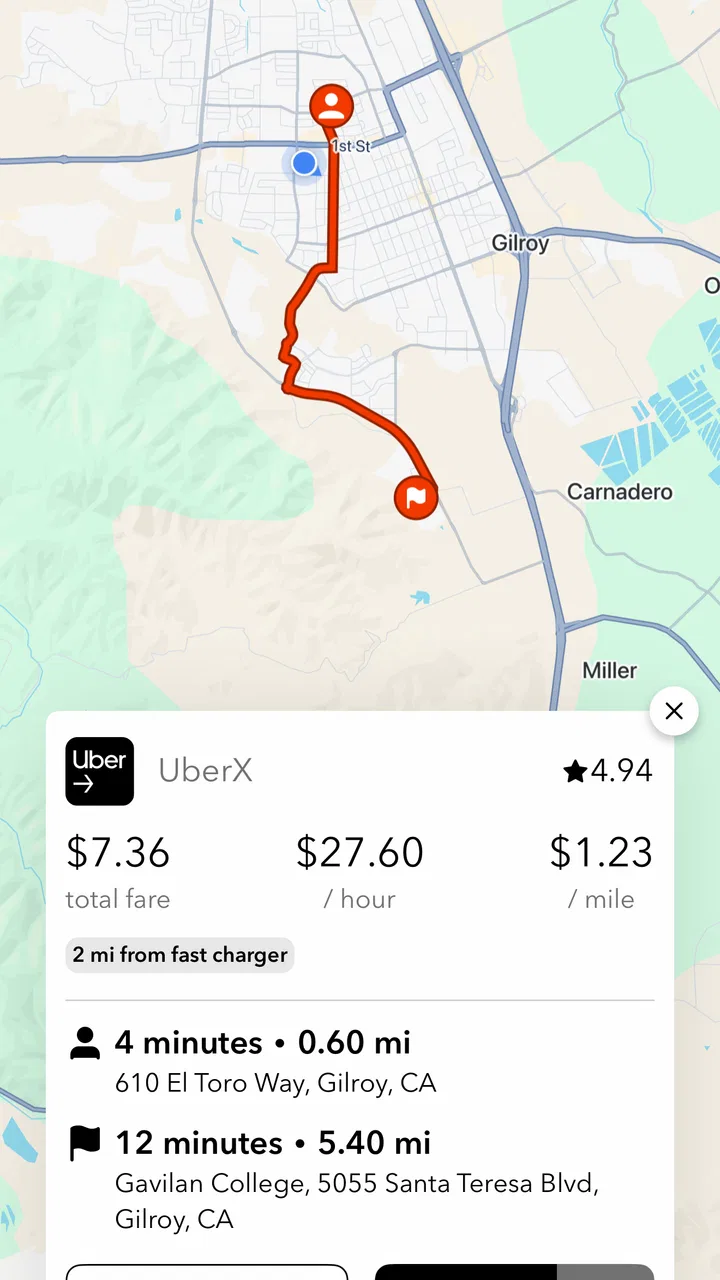
The app’s store summary focuses on helping Uber, Lyft, and DoorDash drivers make more through rideshare app switching. In practical terms, that suggests a driver who wants to keep more than one work app available without manually jumping back and forth every few seconds. The benefit is less about a dramatic new feature and more about removing friction from a familiar routine.
That makes the audience fairly specific. I would consider it for a driver who alternates between rideshare and delivery work, someone who wants to keep two services visible during slow periods, or a new multi-app driver who finds the constant switching confusing. I would not install it expecting a navigation replacement, a complete earnings tracker, or a magic tool that tells me which request is financially best. Those are separate needs, and treating Mystro Driver as if it solves all of them would lead to disappointment.
The public store presence gives the app a 3.7 average from around 5.8 thousand ratings, with more than 350 written reviews and over 100 thousand installs. I read those figures as a sign of a useful but not universally smooth experience. The audience is large enough to show that the idea has practical appeal, yet the rating also suggests that setup, device behavior, or personal expectations can affect satisfaction. I would plan a short test shift before relying on it for a busy working day.
There is also a paid side to consider. The app is free, while in-app purchases range from $4.99 to $139.99 per item. I would not treat any purchase as an automatic part of getting started. First learn whether the basic workflow actually saves you time in your own city and on your own phone. A tool that saves a few interruptions every hour may be valuable to one driver and unnecessary to another, so the sensible decision comes after testing rather than before it.
Start with a controlled setup
For the first session, I recommend choosing a quiet moment instead of beginning five minutes before a busy driving period. Have your Uber, Lyft, or DoorDash credentials available, but do not rush through screens simply because you want to get on the road. The important goal is to understand how Mystro Driver sits alongside the services you use and which app is expected to handle each part of the process.
I would begin with the platform I know best and add another only after the first one behaves as expected. This is a small but important tactic. When something feels wrong, a single-platform test makes it easier to identify whether the issue comes from Mystro Driver, the individual driver app, the phone, or the account itself. Adding every service at once may feel efficient, but it makes troubleshooting much harder.
Pay attention to the wording on each setup screen. Driver tools often depend on how apps are connected and how activity is displayed, so a rushed tap can produce a confusing first shift. I would also keep the original driver apps available and familiar. Mystro Driver is useful only when it complements those services; it should not become the only place where you know how to check your work status.
A practical preparation step is to decide your own rules before testing app switching. For example, you might choose to keep one rideshare service active while waiting, pause the others when you accept a trip, and return to comparison only after completing the current job. The app can help organize the switching, but it cannot decide whether a request fits your personal limits, preferred area, or schedule.
Finding the first meaningful success
The first successful action should be modest: get two supported work apps ready, move into an available state, and complete one clean transition without losing track of which service is active. That is a better test than immediately trying to optimize an entire evening. If you can finish that small workflow calmly, you have learned more than you would by simply opening every screen once.
Imagine a realistic afternoon shift. I am waiting near an area where delivery requests and rideshare requests both appear, but neither is steady enough to justify staring at one app. Instead of repeatedly opening and closing separate screens, I use Mystro Driver as the place from which I manage the available work apps. When a request arrives, I focus on that job, follow the relevant service’s normal process, and avoid trying to compare new offers while I am already committed.
The useful result in that scenario is not necessarily accepting more work. It is maintaining awareness without creating a dangerous or distracting habit. I would still handle the phone only when safely parked or through whatever hands-free arrangement is lawful and appropriate in my location. No switching tool changes the basic responsibility to drive safely.
A less obvious benefit is mental separation. Multi-apping can make a shift feel like one long stream of alerts, but a deliberate sequence helps: wait, review, accept, complete, then reopen the comparison process. Mystro Driver is most helpful when I use it to support that sequence instead of treating every notification as an invitation to react immediately.
Another useful test is to compare a short period with the app and a similar period using your usual manual routine. Do not judge only by the number of requests. Notice how often you reach for the phone, whether you accidentally leave a service active, and whether returning to an app after a delivery is straightforward. These observations reveal the practical value much better than a quick installation.
Where new users can become confused
The biggest source of confusion is likely to be the boundary between Mystro Driver and the services it helps manage. Uber, Lyft, and DoorDash remain separate work platforms with their own screens, requests, rules, and account behavior. If a fare, delivery detail, route, or account issue looks different, I would first check the original service rather than assuming the switching tool controls every detail.
It is also easy to confuse convenience with automation. A smoother transition between apps does not remove the need to review a request carefully. I would still check the information that matters to me before accepting work, including the destination or delivery context shown by the relevant platform. The more quickly a tool moves me from one screen to another, the more important it becomes to slow down for the decision itself.
Drivers may also wonder whether they should keep all services active all the time. I would avoid that approach at the beginning. Start with the smallest combination that reflects your actual shift. If you mainly drive passengers and only occasionally deliver food, test that specific pattern rather than building a complicated setup that creates more notifications than useful opportunities.
Phone performance is another practical consideration. Running several work apps together can make any device feel crowded, especially during navigation or long shifts. If the experience becomes sluggish, drains the battery quickly, or makes it difficult to see the active service, the problem may not be solved by adding more automation. A simpler setup, a better charging routine, or using one primary platform for part of the shift may be the wiser choice.
I would also be cautious about judging the app after one awkward moment. Multi-app workflows have several moving parts, and a single missed transition may come from an expired login, a service being offline, a network interruption, or an unfamiliar screen. Repeat the same small test while parked and note exactly where the process breaks. That turns vague frustration into a problem you can actually evaluate.
How it compares with manual switching
The usual alternative is straightforward: open Uber, Lyft, and DoorDash separately, check them one at a time, and switch back manually whenever a new request appears. That costs nothing beyond the apps themselves and gives you direct control. For a driver who works only occasionally or uses a single platform, manual switching may be perfectly adequate and easier to understand.
Mystro Driver becomes more interesting when the repeated movement between services is the main annoyance. Its advantage is workflow consistency. Instead of remembering the same sequence every few minutes, I can build a routine around one management point and then return to the platform handling the current job. That can reduce cognitive clutter, particularly during a shift with mixed rides and deliveries.
The trade-off is another layer to learn. Manual switching is transparent: I know which app I opened and what it is doing. A switching assistant can feel faster once understood, but unfamiliar behavior is more frustrating when I am already busy. For that reason, I see Mystro Driver as a good fit for a regular multi-platform driver who values reduced friction, not as a universal upgrade for every gig worker.
It also should not be compared directly with a dedicated mileage tracker or budgeting app. Those tools answer different questions, such as how far I drove or whether a shift was profitable after expenses. Mystro Driver’s role is closer to managing access and attention across work services. I would use it alongside other tools only if each one has a clear job; otherwise, the phone can become more complicated than the original problem.
Small workflow choices that make a difference
One of my strongest recommendations is to create a “single active job” rule. Once I accept a ride or delivery, I stop comparing new opportunities until that commitment is complete or I am safely available again. This prevents the common multi-app mistake of accepting overlapping work and then trying to repair the schedule afterward. The app may make switching easier, but discipline still protects the quality of the shift.
A second tip is to test the app at the edges of your normal routine. Try signing in before leaving home, returning to availability after a completed job, and ending the shift deliberately. Those transitions matter more than the exciting moment when a request arrives. If you understand how to start and stop cleanly, you are less likely to leave a service running unintentionally or wonder which platform is currently in charge.
A third insight is to use Mystro Driver as a filter for attention, not as a reason to chase every alert. In a slow market, frequent switching can make a driver feel productive while adding little income. Set a personal boundary around how often you will reconsider platforms and where you are willing to work. The app can reduce the mechanical effort, but it cannot replace a sensible strategy for time, fuel, and fatigue.
For drivers who alternate between passenger rides and food delivery, the best workflow may change by time of day. A lunch period might favor delivery-focused monitoring, while an evening shift may make rideshare the primary activity. I would adjust the setup to match the work I am actually prepared to accept instead of leaving every option equally prominent. That reduces noise and makes the app feel like a tool rather than another dashboard to watch.
Who should use it, and who should skip it?
I think Mystro Driver is worth trying if you already work across multiple supported services and manual switching regularly interrupts your attention. It is especially suitable for someone who has a repeatable shift pattern, understands the basics of the individual driver apps, and wants a more orderly way to move between them. New multi-app drivers may also appreciate it after learning each service separately first.
I would skip it if you drive exclusively for one platform, rarely work, or dislike adding a management layer to a simple routine. If your current method is already clear and safe, the app may not create enough improvement to justify learning it. I would also avoid depending on it before a major shift until I had tested the complete start-to-finish workflow on my own device.
The Everyone age rating makes it broadly accessible from a store perspective, but that does not mean every driver will find it appropriate for every situation. The real question is whether its switching approach fits your habits and whether you can use it without increasing distraction. A tool designed to save attention is not helpful if it encourages more screen checking.
My next-step recommendation
After the first successful test, I would expand gradually. Add the second service only when the first workflow feels predictable, then use a short parked trial to see how requests, acceptance, and returning to availability fit together. Keep your normal driver apps available, and make sure you know how to continue working manually if Mystro Driver does not behave as expected on a particular day.
Only after that trial would I think about the in-app purchase range. The free starting point is useful because it lets you judge the central idea before spending money. If the app consistently reduces interruptions across several shifts, a paid option may deserve consideration; if it does not, paying will not fix a mismatch between the tool and your driving style. I would make that decision based on saved effort and clearer attention, not on the hope of guaranteed earnings.
In the end, Mystro Driver: Drive & Deliver is a focused productivity app for a focused problem. I like its potential because it recognizes that multi-platform driving is often difficult for organizational reasons rather than technical ones. Its value appears when I use it with a simple plan, one active job at a time, and realistic expectations about what an app can control.
My recommendation is cautious but positive for drivers who genuinely juggle Uber, Lyft, and DoorDash. Give it a calm setup session, test one complete workflow while parked, and judge it over a few ordinary shifts. If manual switching is costing you attention, this may make the routine feel more manageable. If you use only one service or prefer total manual control, staying with the usual apps may be the cleaner choice.
FAQs for Mystro Driver: Drive & Deliver
01What is Mystro Driver: Drive & Deliver, and who is it designed for?
Mystro Driver: Drive & Deliver is an app designed for drivers who work with multiple delivery and rideshare platforms. It helps organize incoming requests, manage active work, and switch between supported services from one place. It is mainly intended for independent drivers who want to reduce the need to constantly open and monitor several separate apps while working.
02Which rideshare and delivery platforms are compatible with Mystro Driver?
Compatibility can vary depending on your location, operating system, account type, and the services currently supported by Mystro. Before downloading, check the app’s official compatibility list to confirm that your rideshare or delivery platforms are included. Support may also change over time, so an app that works in one city may not offer the same features or integrations in another.
03Does Mystro Driver automatically accept rides or delivery orders?
Mystro may provide automation features that help manage requests according to preferences you configure, but availability and behavior depend on the supported platform and your device settings. Drivers should review every automation option carefully before enabling it. You remain responsible for understanding the rules of each connected service, since using third-party automation could potentially affect account standing or platform compliance.
04Is Mystro Driver free to download and use?
The app may be available to download without an upfront charge, but some tools or automation features can require a subscription, trial, or in-app purchase. Pricing and plan details may differ by region and can change over time. Review the current information in the Google Play Store or Apple App Store before subscribing, including renewal terms and cancellation requirements.
05What permissions and phone settings does Mystro Driver require?
Because Mystro is intended to work alongside other driver and delivery applications, it may request permissions such as location access, notifications, display-over-other-apps, accessibility features, or permission to run in the background. These settings can affect battery life and privacy. Grant only the permissions you understand, and review the app’s privacy policy before connecting your work accounts.
Pros
- Combines multiple delivery and rideshare apps in one driver workflow.
- Automatically tracks active driving time to help manage long shifts.
- Can reduce app switching while accepting and completing orders.
- Useful earnings summaries make it easier to compare busy periods.
- Designed to work with popular gig platforms and existing driver accounts.
Cons
- Requires access to several driver apps and may need frequent account reauthorization.
- Automation behavior can vary after updates to supported platforms.
- May increase battery and mobile data usage during long driving sessions.
- Some features may be limited by subscription or platform compatibility.
- Drivers must still monitor each platform to avoid missed alerts or requests.

Mystro Driver: Drive & Deliver
Gallery